Soku AI

Last verified: 2026-11-13. Soku's documentation monitor captured 68 OpenAI ads pages at 00:19 UTC on 2026-11-13 (run-20261113T001924Z), 40 from the help centre and 25 from the developer docs, with no capture errors. It compared them with the capture from 2026-11-10 (run-20261110T000256Z). Quotations are from those captures and from two openai.com pages fetched the same morning: the November 10 announcement Introducing Businesses in ChatGPT and the Business Agents Policy. Paragraphs marked Soku analysis are our interpretation, not OpenAI's wording.
OpenAI has published the first setup guide for its chat ad format. The new help article Setting up a Sponsored Business Agent in Ads Manager was not in our capture on November 10 and was there on November 13. It explains how to build an agent in Ads Manager, how to test it, and how to attach it to a campaign. It also answers ten questions that decide whether the format is worth your time: which objective it needs, what you can see, what it costs, and what you cannot connect.
Until now, all an advertiser could read about this format was a three-paragraph page saying it existed and was closed to new advertisers. This guide sets out what the new article says, where it disagrees with that older page, and how to decide whether to set one up when access reaches your account. For the platform as a whole, start with our complete ChatGPT Ads guide.
The short version
- What it is. An ad in ChatGPT with two controls, Start chat and Visit site. Start chat opens a conversation with an AI agent that you configure to represent your business.
- Who can use it. Access is limited, and OpenAI describes it two ways: "rolling out to eligible advertisers in Ads Manager over the coming weeks" in the new article, and "a limited alpha test" with no early-access requests in the older one. On November 10 OpenAI said Business Agents are "now available to eligible ecommerce and online service businesses in the United States".
- What it needs. A published agent built in Business agent > Agent builder in Ads Manager, and a campaign with the Conversion optimization objective that has Enable agent chats turned on.
- What you cannot see. Individual chats or transcripts. You get impressions and clicks, and aggregated patterns in an Insights tab where available.
- What it costs. No separate charge for conversations or messages. The campaign's billing settings apply.
- What you cannot do. Bring your own agent, run your own plugin, or reuse the agent you built in Business Hub. Settings do not sync between Business Hub and Ads Manager yet.
- The developer docs say nothing about it. None of the 25 developer-docs pages we monitor mentions business agents or agent chats, so there is no API path documented for any of this.
What OpenAI now documents, step by step
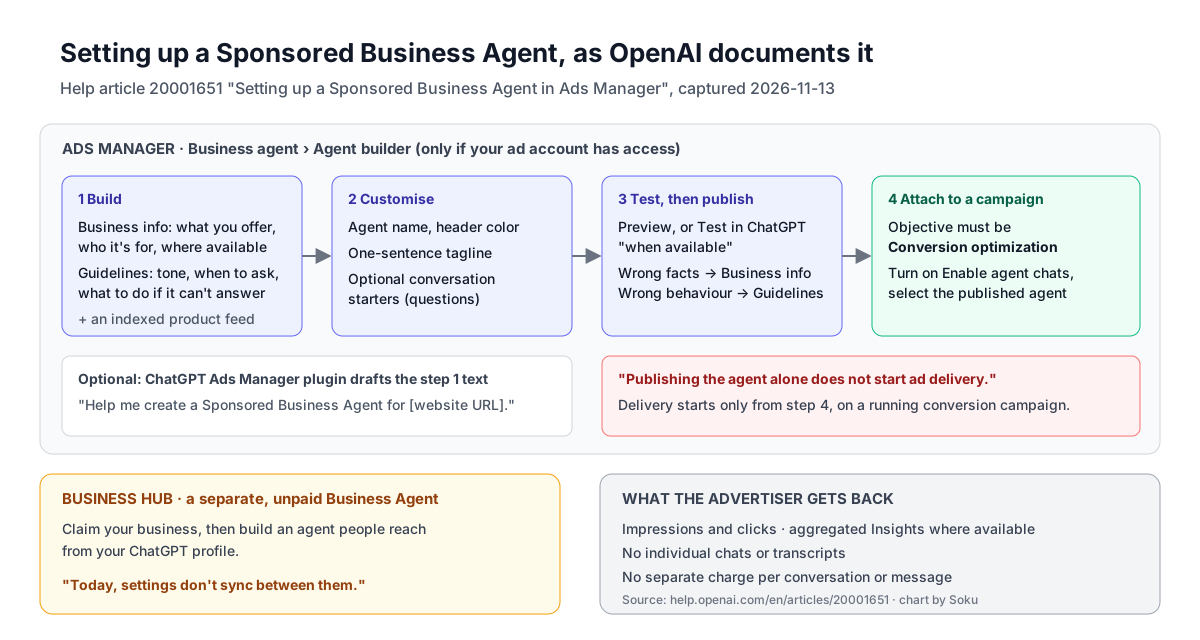
The article has four sections and an FAQ. In order:
1. Build the agent
When your ad account has access, OpenAI says to "select Business agent \> Agent builder in the Ads Manager sidebar." The agent has two text fields that do the work:
- Business info: "describe what you offer, who it's for, and where it's available. Link to your product or service pages, privacy policy, and support."
- Guidelines: "set the agent's tone, when it should ask questions, and what to do if it can't answer."
OpenAI warns to "Keep private business information, customer data, passwords, and payment details out of both fields." For product recommendations, "select an available product feed and check that it's indexed." The agent can therefore draw on the same product feed you use for feed-based campaigns.
You can have the ChatGPT Ads Manager plugin draft both fields. OpenAI's suggested prompt is "Help me create a Sponsored Business Agent for [website URL]." The plugin can work from your site "and any brand guide or FAQ you share." You then paste each draft into its field. Agent builder may also offer its own draft from your website, which you can edit, or you can select Continue manually.
2. Customise what people see
Three things appear to the customer, all checked in Preview:
- the agent name and header color,
- an agent tagline that "tells customers in one sentence how the agent can help",
- optional conversation starters, written as questions a customer can select.
OpenAI's worked example is a fictional brand, Nova One, which sells products in several finishes and colours. Its tagline is "Compare finishes and colors to find a look you like." Its starters are "Which finish would suit my style?" and "What's your return policy?"
3. Test, then publish
OpenAI says to "Save your changes and try questions your customers might ask," using Preview or Test in ChatGPT "when available". Its three test questions for Nova One are a useful pattern for any business:
| Test question | What OpenAI says to check |
|---|---|
| "I like neutral colors. Which finish would you suggest?" | "the agent recommends an available option and explains why it fits" |
| "Can I return a customized order?" | "the answer matches your return policy and links to it" |
| "Will you release a new color next month?" | "If you haven't announced one, the agent should say it doesn't have a confirmed date" |
The rule for fixing answers is split by field: "If an answer is inaccurate, update Business info. To change how the agent responds, edit Guidelines." OpenAI says to publish "when the answers and links are accurate."
If publishing is blocked, the FAQ says to "Check the message in Agent builder. If it flags an instruction, make the required change in Guidelines". If you are still blocked, email [email protected] with the error message.
4. Attach it to a campaign
This is the step most likely to be missed. "Publishing the agent alone does not start ad delivery." To show the agent in an ad:
- "In the ad account where you published your agent, choose a campaign with the Conversion optimization objective."
- "When you create or edit a conversion campaign, turn on Enable agent chats in campaign settings and confirm that your published agent is selected."
- "Review the campaign settings and save."
The resulting ad shows Start chat and Visit site. "Once the campaign is running, you can review impressions and clicks in Ads Manager."
Who can use it: three OpenAI pages, three descriptions
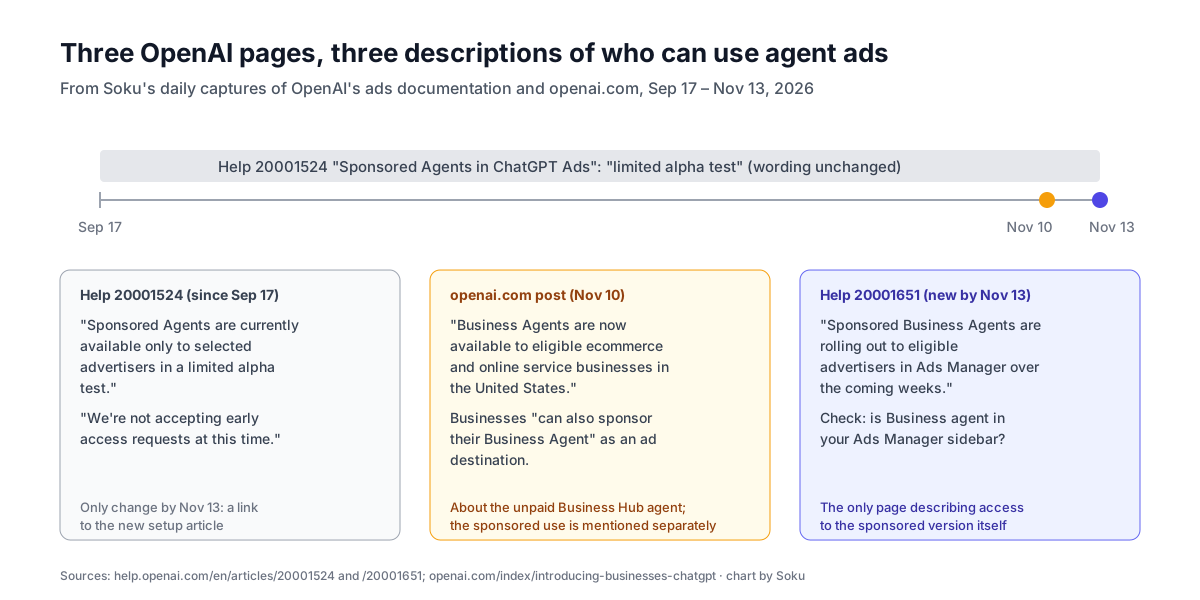
OpenAI now describes access to this format in three places, and they do not say the same thing.
| Source | What it says about access | Dated |
|---|---|---|
| Help article Sponsored Agents in ChatGPT Ads | "Sponsored Agents are currently available only to selected advertisers in a limited alpha test." "We're not accepting early access requests at this time." | First captured 2026-09-17. Page showed "Updated: 16 days ago" on 2026-11-13. Wording unchanged in our captures since then |
| Blog post Introducing Businesses in ChatGPT | "Business Agents are now available to eligible ecommerce and online service businesses in the United States." Businesses "can also sponsor their Business Agent and use it as the destination for ChatGPT Ads" | November 10, 2026 |
| Help article Setting up a Sponsored Business Agent in Ads Manager | "Sponsored Business Agents are rolling out to eligible advertisers in Ads Manager over the coming weeks." | Not in our 2026-11-10 capture. Showed "Updated: 20 hours ago" on 2026-11-13 |
The only change to the older article between November 10 and November 13 was that it gained a link to the new one in its related-articles list. Its access wording was not updated.
Soku analysis. These are not necessarily in conflict, because they may describe different things. The blog post's "now available" sentence sits in a paragraph about Business Agents, the unpaid agent a business builds in Business Hub, and the sponsored use is mentioned separately as something businesses "can also" do. The new help article is the only page that describes access to the sponsored version in Ads Manager, and it says "rolling out". The older article was written when the format had a different name ("Sponsored Agents") and no setup flow. The most likely reading is that the older article is out of date. But OpenAI has not said so, and until it is updated, the safest thing to assume is that access to the sponsored version is still selective. Plan for it as something that may reach your account, not something you can turn on.
The FAQ in the new article tells you how to check: "Check that you've selected the right ad account in Ads Manager. If Business agent still doesn't appear in the sidebar, your OpenAI representative or Ads Manager support can confirm whether your account has access."
Business Hub and Ads Manager: two agents, not one
OpenAI launched two products on November 10. Business Hub is where a business claims its profile in ChatGPT, keeps its information current and sees aggregated insights such as "the number of mentions and website clicks a business receives". Once claimed, "eligible organizations can build, test, and launch a Business Agent" that people can reach from the business's ChatGPT profile, without any ad spend.
The sponsored agent is a separate object. The help article's FAQ says:
We're working on linking Business Hub and Ads Manager so you can use the same agent for ads. Today, settings don't sync between them. Open Agent builder in your eligible ad account and reuse your business information and guidelines there.
Claiming your business is also a separate step. The FAQ points to Business Hub and Add business, says OpenAI "will email you after reviewing your claim", and says Shopify merchants can select Shopify store then Connect Shopify. Existing OpenAI Enterprise customers and advertisers "can work with their OpenAI representative."
Soku analysis. If you build both, you are maintaining two copies of the same instructions. A price change, a new returns policy or a discontinued product has to be updated in both places, and nothing will warn you when they drift apart. Until OpenAI links them, keep one master document for Business info and Guidelines and paste from it into both, with a date on each paste.
What you can and cannot see
Measurement is where this format is most limited, and the article is direct about it.
| Question | OpenAI's answer |
|---|---|
| Can I read individual chats? | "Advertisers don't receive individual chats or transcripts." |
| What do I get instead? | "Where available, the Insights tab in Ads Manager shows patterns across conversations, such as the questions customers ask most often." |
| Is there more analysis? | "Once your agent has had more than 25 conversations, the insights agent can help you explore those patterns in more detail." |
| What campaign metrics are named? | "Once the campaign is running, you can review impressions and clicks in Ads Manager." |
| Is privacy handled the same way in Business Hub? | The November 10 post says: "We don't share users' conversations or Business Agent chats with businesses. Insights are aggregated and are only available when there are enough conversations or interactions to meet certain thresholds." |
The article does not say whether a Start chat tap counts as a click, whether conversations appear as a metric in campaign reporting, or how a purchase made after a chat is attributed. The campaign must use the Conversion optimization objective, so your conversion tracking still applies. See our guides to the ChatGPT Ads Pixel and attribution and conversion-optimized campaigns.
Soku analysis. Because you cannot read the conversations, you cannot audit what the agent told any given person. Your only quality controls are the testing you do before you publish and the aggregated questions in Insights afterwards. That makes the pre-publish test the most important part of setup, not a formality. Write your test questions from real support tickets and sales objections, include questions the agent should refuse or defer, and run them again after every edit.
What it costs
Am I billed separately for agent chats? No. Your campaign's billing settings apply to the ads that use your agent. There's no separate charge for an agent conversation or for each message in a chat.
Soku analysis. This means the cost of a long conversation is not passed to you per message. It does not mean agent chats are free. You pay what the campaign pays under its bidding and billing settings, which for a Conversion optimization campaign means the bid strategy you chose. OpenAI's bidding changed on November 9, with Target CPA and Target CPC replacing Max Bid and Max CPC. Judge an agent campaign on cost per conversion against the same campaign without agent chats, not on how many conversations it produced.
What you cannot bring
Two FAQ answers close off options that technical teams will ask about first:
- "Can I bring my own agent?" "No. For now, use Agent builder in Ads Manager to create your sponsored agent."
- "Can I connect my own plugin to a Sponsored Business Agent?" "No. A Sponsored Business Agent can't currently run your own plugin."
The ChatGPT Ads Manager plugin can draft your text, but OpenAI describes that only as help with "the agent's business information and guidelines". There is no documented way to connect the agent to your inventory system, CRM, booking engine or checkout. What it knows comes from Business info, Guidelines, the links you provide and the product feed you select.
Soku analysis. For most ecommerce brands this is enough to answer pre-purchase questions: which product, which size, what the returns policy says. It is not enough for questions that depend on live data the feed does not carry, such as stock at a specific store, delivery dates to a postcode or account-specific pricing. Write a Guideline telling the agent to send those questions to the right page on your site rather than guess.
The policy that governs what the agent may say
OpenAI published a Business Agents Policy, dated November 10, 2026. It applies when a business "creates, publishes, or edits an agent", and it notes that "Additional advertising policies may apply when an agent is promoted through an ad." The rules that matter most when writing Business info and Guidelines:
- Disclose that it is AI. "An agent must be clear that it is AI representing the business; do not make it appear to be an independent adviser, a human, or endorsed by OpenAI."
- Do not invent facts. "Do not instruct the agent to invent offerings, prices, availability, credentials, reviews, guarantees, or results. Do not hide material fees, conditions, or limitations when they matter to a user's question."
- No pressure. "Do not configure an agent to pressure people, create false urgency, exploit vulnerability, or keep pushing a sale or follow-up after someone declines."
- No sensitive data. Do not ask for "health details, protected traits, government IDs, or financial or authentication credentials".
- No professional advice. The agent "must not provide users with advice that legally requires a professional license".
- Eligibility is a separate decision. "We consider both the business category and the agent's intended use before allowing publication." "Business verification alone does not guarantee agent eligibility."
The policy says OpenAI "may suspend or remove your agent" and may restrict "a business's ability to create or manage agents—particularly when concerns are serious or repeated." It applies again "whenever you update it", so every edit is reviewed under the same rules.
Soku analysis. Several standard sales-chat tactics break these rules: countdown offers, "only 2 left" prompts, asking for an email before answering, and repeated follow-ups. If your Guidelines are adapted from a live-chat script, remove those lines before you publish. If a publish is refused, the help article says to change Guidelines in response to the flagged instruction. The policy adds that "Updates should address review decisions rather than work around them."
Should you set one up?
OpenAI's documentation does not give performance data, and we have none of our own for this format. What follows is a framework for deciding, not a forecast.
It is a good fit if:
- you already run a Conversion optimization campaign with working conversion tracking, so you have a baseline to compare against;
- buyers ask the same handful of questions before purchasing (fit, size, compatibility, returns), and the answers are on your site;
- you have a clean, indexed product feed the agent can recommend from;
- you sell in the United States in an ecommerce or online service category, which is where OpenAI says Business Agents start.
Wait if:
- your category involves regulated advice (health, legal, financial), which the policy restricts;
- the questions buyers ask depend on live data the agent cannot reach;
- you have no conversion tracking, because impressions and clicks alone will not tell you whether chats help.
How to test it when access arrives. Run the same conversion campaign twice, one with Enable agent chats on and one without, with the same budget, bid strategy and creative. Compare cost per conversion over the same dates. Read the Insights tab weekly for questions the agent is getting that your site does not answer well, and fix the site as well as the agent.
What OpenAI has not said
The new article leaves these open. We list them so you can ask your OpenAI representative rather than assume:
- Whether the older "limited alpha" article is still accurate, or will be updated.
- Which markets and categories "eligible advertisers" covers in Ads Manager, beyond the November 10 statement about ecommerce and online service businesses in the United States.
- Whether a Start chat tap is counted and billed as a click.
- Whether conversations or chat starts appear as a reporting metric or column.
- How a conversion that follows a chat is attributed, and whether the attribution window differs from a Visit site click.
- Whether agent chats can be turned on for objectives other than Conversion optimization in future.
- When Business Hub and Ads Manager agents will be linked, and what will happen to separately maintained copies.
- Whether the agent can be managed through the Advertiser API. None of the 25 developer-docs pages we monitor mentions it.
Two smaller documented changes this week
Pixel testing in Ads Manager. Both documentation surfaces added a test flow for the Web Pixel between November 10 and November 13. The developer Measurement Pixel guide now has a "Test your Pixel in Ads Manager" section: go to Conversions > Data Source, open the Pixel's three-dot menu, select Test, enter a page URL and select Start testing. Events from that session carry a Test label in Event Stream. "Test labeling lasts up to 30 minutes and applies to the selected Pixel in the opened tab on the same website origin," and "test events still count in normal analytics." The help article Troubleshooting conversion tracking added the same steps, with the caution that "event receipt does not prove attribution."
Regional targeting for product feeds: announced, not documented. OpenAI's advertiser product-update email of November 12, 2026 said: "You can now target specific regions or markets within a country" for product feed campaigns. On November 13 both documentation surfaces still say the opposite: "New product-feed campaigns support geographic targeting and exclusions only at country level." We treat the regional targeting as announced but not yet documented. Our country-level product feed guide has a dated note with both quotations.
Related reading
- Complete ChatGPT Ads guide
- ChatGPT Ads conversion-optimized campaigns
- ChatGPT Ads Target CPA and Target CPC
- ChatGPT Ads product feed campaigns
- ChatGPT Ads context hints
- Meta Business AI agent guide, for how Meta's comparable product handles the same problem
Sources
All accessed 2026-11-13.
- OpenAI Help Center: Setting up a Sponsored Business Agent in Ads Manager
- OpenAI Help Center: Sponsored Agents in ChatGPT Ads
- OpenAI Help Center: Use the ChatGPT Ads Manager plugin
- OpenAI Help Center: Troubleshooting conversion tracking for ChatGPT Ads
- OpenAI Help Center: Creating campaigns for ChatGPT Ads
- OpenAI: Introducing Businesses in ChatGPT (November 10, 2026)
- OpenAI: Business Agents Policy (updated November 10, 2026)
- OpenAI developer docs: Measurement Pixel, Campaign Targeting, llms.txt
- OpenAI advertiser product-update email, "ChatGPT Ads Product Updates", November 12, 2026 (cited only for the regional-targeting announcement, which is not yet documented)