Soku AI

Last verified: 2026-11-09. Soku's documentation monitor captured 67 OpenAI ads pages at 00:03 UTC on 2026-11-09 (run-20261109T000331Z) with no capture errors and compared them with the previous capture (run-20261105T013141Z). Quotations come from those captures and from OpenAI's developer docs fetched the same day. Paragraphs marked Soku analysis are our interpretation, not OpenAI's wording.
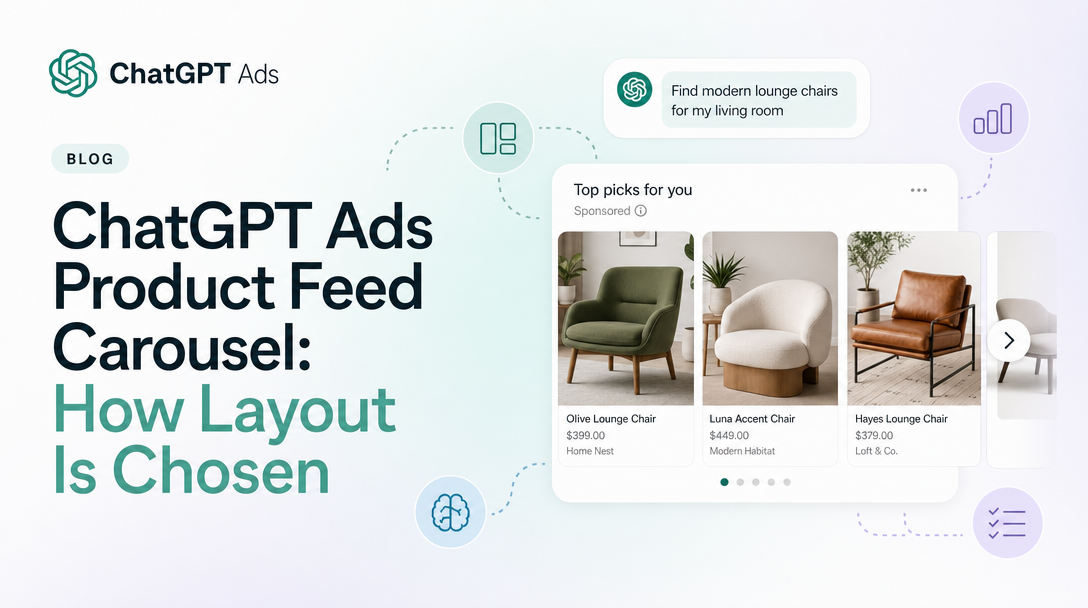
ChatGPT Ads product-feed campaigns can now officially show more than one product at a time. Between November 6 and November 9, 2026, OpenAI's help article Create campaigns from product feeds gained a new section headed "How is the layout selected for product-feed ads?". It says a feed campaign can show a single product card or a carousel of several products, that OpenAI picks the layout, and that products shown together come from the same ad group.
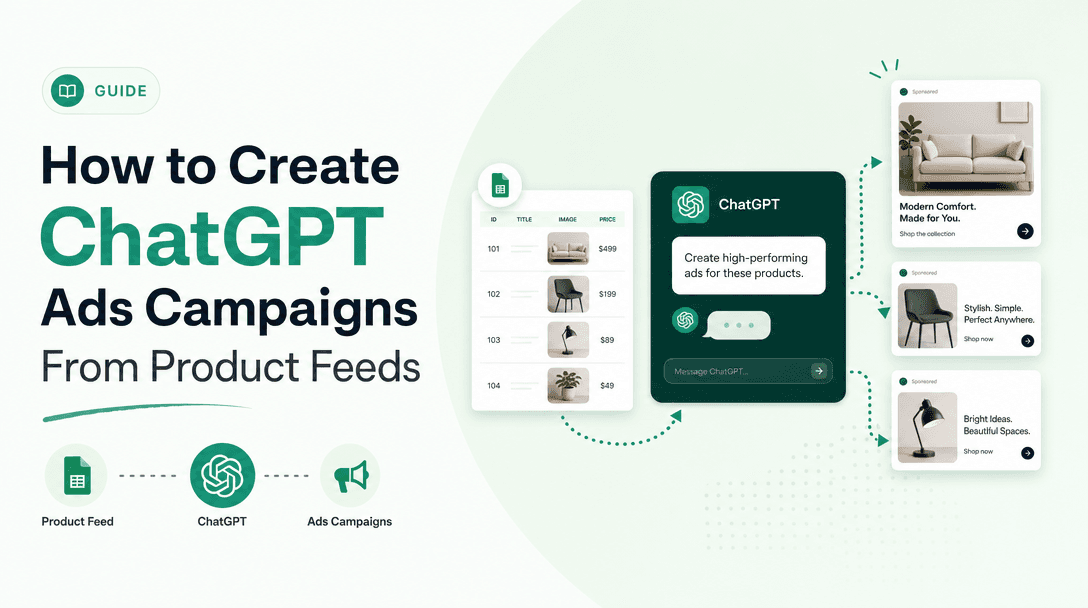
That last point matters most. If a carousel can fill itself with other eligible products from the same ad group, then how you build ad groups decides which products share a unit with your best seller. This guide covers the exact wording, how it compares with what OpenAI said before, what the developer docs add, and what to change in your feed and ad group setup. For the wider picture of the platform, start with our complete ChatGPT Ads guide. For campaign setup from scratch, see how to create ChatGPT Ads campaigns from product feeds.
The short version
- Carousels are now documented. A product-feed campaign "can show a single product card or multiple products in a carousel."
- You do not choose. "OpenAI selects the layout automatically, so no separate format setup is required." No published setting or opt-out exists.
- The ad group is the pool. "Other relevant, eligible products from the same ad group can appear together."
- The preview is not a promise. "The sample product preview does not guarantee the live layout or the number of products shown."
- The API has card-level metrics. OpenAI's developer Reporting guide documents
product.carousel_product_card_impressionsandproduct.carousel_product_card_clicks, and says a card impression is not a billable ad impression. - Much is still unstated: how many products a carousel holds, how they are ordered, how a click on one card is billed, and how conversions are credited to a product.
What changed in OpenAI's wording
The carousel first came up in OpenAI's advertiser product-update email of August 5, 2026, which said OpenAI had "started testing a carousel format for product feed ads that shows multiple products from an advertiser in a single unit." At the time it was a test that appeared only in that email. We covered it then in our post on conversion bidding for product feed campaigns and advised not to plan around it.
The help centre's description of feed ad formats has changed twice since then. Here is the wording from our daily captures of the same article:
| Capture date | What the help article said about format |
|---|---|
| Through 2026-08-12 | "Ads created from product feeds will use the same format as our current ad units but may evolve in the future. The ad title and description will be pulled directly from your product feed" |
| 2026-08-13 to 2026-11-05 | "Product ads use formats designed specifically for showcasing items from your catalog, featuring details such as product images, titles, stars, prices, sales prices, and your brand" (no mention of layout or carousel) |
| 2026-11-09 | The sentence above is unchanged, and a new section "How is the layout selected for product-feed ads?" is added between Step 6 (ad template) and Step 7 (review and launch) |
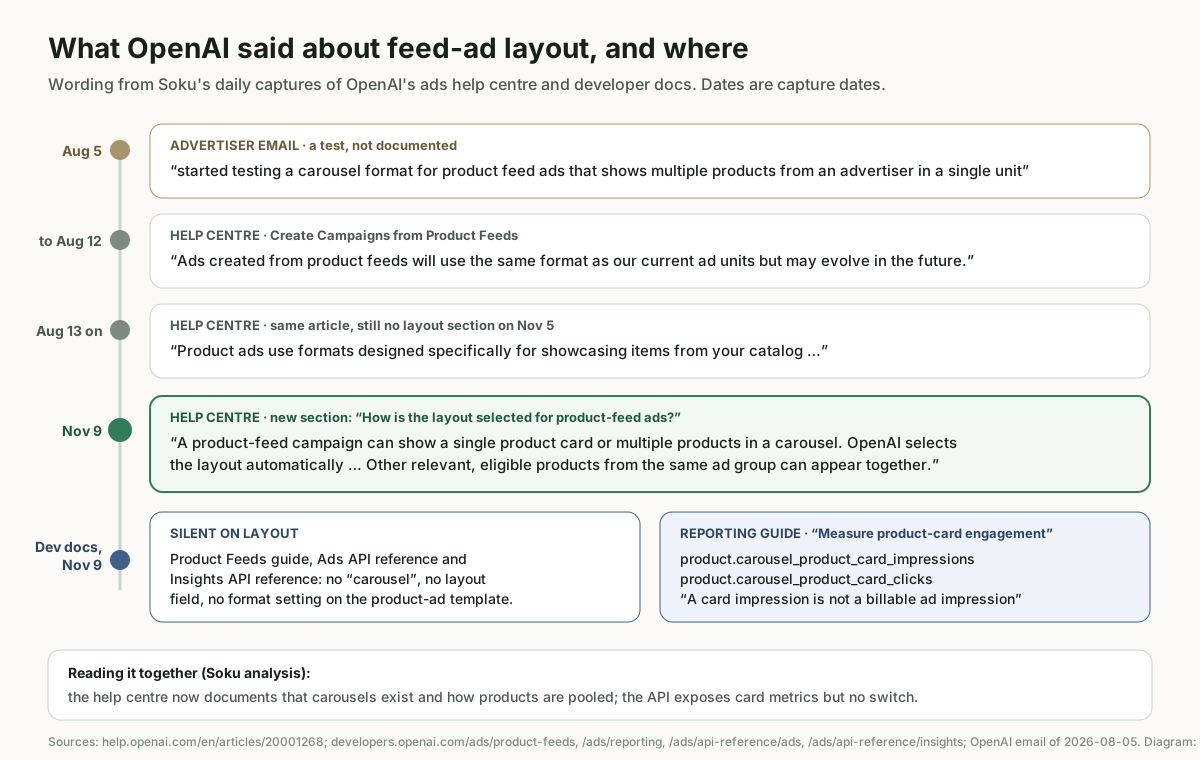
The help centre now confirms what the August email described as a test. We cite the help article for the fact. The email is part of the history.
What OpenAI's documentation says
Here is the new section in full, as captured on November 9, 2026:
## How is the layout selected for product-feed ads?
A product-feed campaign can show a single product card or multiple products in a carousel. OpenAI selects the layout automatically, so no separate format setup is required. Other relevant, eligible products from the same ad group can appear together.
The sample product preview does not guarantee the live layout or the number of products shown.
Each sentence has a practical effect.
"A single product card or multiple products in a carousel." Both layouts belong to the same campaign type. There is no separate carousel campaign, ad group or ad. Any product-feed campaign can serve either one.
"OpenAI selects the layout automatically." The same article says the ad template "currently only supports making a selection for your image field" and that "Only one ad template is necessary per ad group." In the Ads API, a product_ad_template creative takes a title, body and price built from macros ({{brand}}, {{product.title}}, {{product.body}}, {{product.price}}), and the Ads reference says "A product-feed ad group can contain at most one non-archived product_ad_template ad." Neither surface has a layout field.
"Other relevant, eligible products from the same ad group can appear together." "Eligible" has a documented meaning. A product has to be in the campaign's feed, marked ads-eligible, pass the ad group's product filters and meet serving requirements. The Product Feeds developer guide says an out-of-stock product "stops qualifying for delivery after the change propagates", and the help article says items "expire after 2 weeks" unless the feed is refreshed. OpenAI does not define "relevant" for carousels. Its general article on creating ads says only that ChatGPT "considers multiple relevance signals, including conversational intent".
"The sample product preview does not guarantee the live layout or the number of products shown." The preview in Step 6 is a sample. It shows how one product's title and description render. It does not show whether a live impression will be one card or several, or how many products appear.
How the developer docs compare
According to our monitor, none of the developer pages it tracks changed between November 5 and November 9. We also fetched every page listed in developers.openai.com/ads/llms.txt as Markdown on November 9 to look for carousel and layout wording. The results are mixed:
- Product Feeds guide, Ads API reference and Insights API reference: no mention of carousels, layouts or multiple products per unit. The product-ad template has no layout parameter.
- Reporting guide (developers.openai.com/ads/reporting): under "Measure product-card engagement" it says:
For product-feed campaign ads with multiple product cards, you can also request
product.carousel_product_card_impressionsandproduct.carousel_product_card_clicks. These measure interactions with individual product cards. A card impression is not a billable ad impression, and card clicks are distinct from the ad click metric.
The two sources agree on the main point: multi-product feed ads exist. The help centre explains how products are pooled. The Reporting guide explains how to measure individual cards. There is one gap inside the developer docs, though. The Insights API reference documents product-segment metrics such as product.impressions, but it does not list the two carousel card fields. Our monitor does not track the Reporting guide, so we cannot say when that section was added. We only know it was there on November 9.
Soku analysis: your ad group is now your carousel
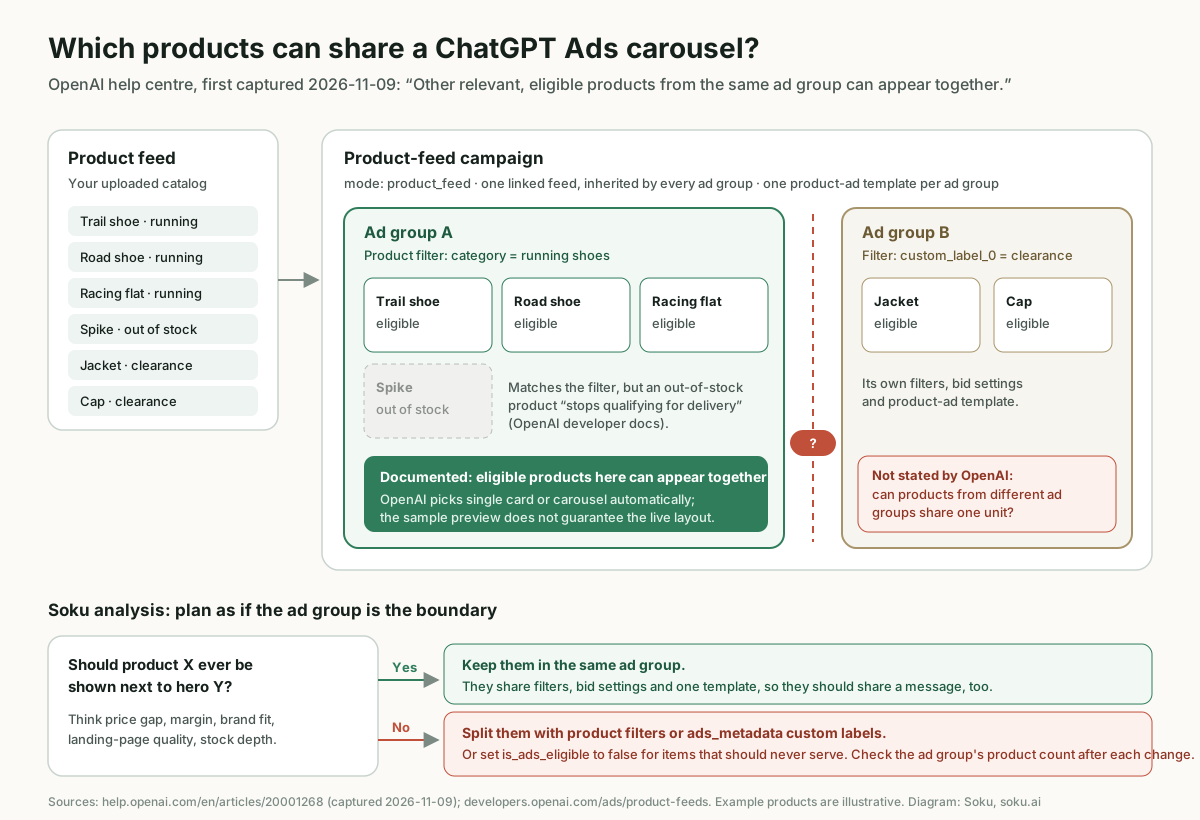
Before November 9, an ad group in a feed campaign mainly decided which products could serve and at what bid. Now it also decides which products may be shown together. That puts four decisions at the ad group level.
1. Group products that make sense side by side
OpenAI's general advice on ad groups (Create ad groups for ChatGPT Ads) is to "Group ads around a shared product category, service, theme, or customer need" and to "Create separate ad groups when they require different messaging or landing pages." That advice was written for standard ads, but it suits carousels well. A unit showing three trail shoes is a comparison. A unit showing a trail shoe, a phone case and a clearance scarf is noise.
A single ad group that covers your whole catalog is the easiest setup. It is also the one where you have least say over what appears next to what. If your feed campaign has one ad group with no product filters, every eligible product in the feed is in the same pool.
2. Split by price and margin, not just category
Even inside one category, some pairings work against you. A premium product shown next to a much cheaper alternative from your own catalog invites the shopper to trade down. The help article already suggests using ads_metadata values "such as bidding_tier or product_line" to organise products for ad group setup. Margin tier and price band are good candidates for the same treatment, because they decide both how much you can bid and which products should compete for attention in one unit.
3. Keep products you never want shown together apart
There are three documented ways to keep a product out of a given pool:
- Product filters. Filter the ad group by brand, category, price, item ID or an
ads_metadatafield. The developer guide says "Each product must satisfy the filters together," and that an update should include the complete list of filters you want to keep. - Ads eligibility. In Ads Manager, products are ads-eligible by default "unless an item is explicitly marked false for ads eligibility." In a feed, that is the
is_ads_eligiblefield. - Availability. Out-of-stock items stop qualifying for delivery, so keeping stock status current also keeps sold-out products out of a carousel. The Delta Feeds API is the documented way to change an existing item's availability without uploading the whole catalog again.
OpenAI does not say whether products from different ad groups in the same campaign can share a unit. It only says products from the same ad group can. Until that is clarified, we would treat the ad group as the boundary and not rely on separation between campaigns or ad groups that OpenAI has not documented.
4. Use custom labels for grouping, not targeting
Custom labels in ads_metadata are how you build these groupings when the standard fields are not enough. OpenAI points out a common mistake twice: a filter matching custom_label_0 to WA "selects products carrying that label; the label itself does not restrict delivery to users in Washington." Labels decide which products are in the pool. They do not decide who sees them. Our post on product-feed geo-targeting and custom labels explains why feed campaigns target at country level only.
After every change, check the product count shown when you edit the ad group. OpenAI recommends it to "confirm how many uploaded products pass your filters". It is the quickest way to see what a carousel can draw from.
What the preview caveat means in practice
The preview sentence is short, but it changes how you QA a launch. Step 7 of the help article asks you to confirm that "Product titles, descriptions, images, and landing pages appear as expected" and that "Your ad template previews correctly." Both checks still matter. But the preview only shows what one product looks like. It cannot show you every combination a carousel might produce.
Soku analysis: to QA a carousel, check the pool, not just the preview. Export or query the products that pass each ad group's filters (the developer docs document POST /v1/feeds/{feed_id}/products/query for this) and scan them as a set. Look for missing or off-brand images, titles that only make sense on their own, prices that look odd next to each other, and products whose landing pages you would not want a shopper to reach from a comparison.
What changes for creative
A feed ad gets its creative from the product data, not from a designer. The help centre lists product images, titles, stars, prices, sales prices and your brand as elements of product ad formats. In a carousel, several products' data appear side by side. Soku analysis: that creates three new risks.
- Inconsistent images. One product on a white background next to another in a lifestyle scene looks untidy. If your ad template lets you choose which image field to use, choose the one that is most consistent across the products in that ad group.
- Titles that depend on a hero. A template such as
{{brand}}: {{product.title}}is applied to every product. Titles written to stand alone ("The one you need") read badly in a row. Descriptive titles hold up better. - Stale prices. Sale prices and regular prices from different refresh cycles look worse side by side than they do one at a time. Keep price and availability updates on the same schedule.
This is a different format from the multi-image ads OpenAI opened in beta on October 26. A multi-image ad is a standard ad with four to six square images you upload yourself, all linking to one destination URL. A feed carousel shows several products from your catalog, each with its own product data. The two should not be confused in planning or reporting.
OpenAI has not said whether creative enhancements, which can rewrite headlines and descriptions for standard campaigns, apply to product-feed ads or carousels. The help article on enhancements does not mention feeds.
What changes for reporting and measurement
The documented reporting tools for feed campaigns were already product-level, and the carousel adds one more layer.
- Products tab in Ads Manager. The help centre describes it as "a reporting view" that shows products only after they have delivery data. Rows can take up to seven hours to appear after delivery begins. Our post on ChatGPT Ads reporting delays covers the refresh times.
- Product-segmented Insights in the API. Add
segments[]=productto get per-product impressions, clicks, spend and CTR. The Reporting guide says product reports do not support hourly granularity, and it lists about 30 days of available data for product reporting. - Card-level metrics in the API.
product.carousel_product_card_impressionsandproduct.carousel_product_card_clicks, for ads with multiple product cards. - Tracking parameters. Every product links to its own destination URL from the feed. The developer guide says "Individual products have no separate configurable ad entity; the ad's tracking settings apply to their destinations." Configured parameters override matching keys in the feed URL, and feed parameters without a matching key stay in the final URL. Our tracking parameter precedence post explains the order.
Soku analysis: since each card goes to its own product URL, your analytics can already tell which product a visitor landed on, without any new configuration. If you add product-specific parameters to feed URLs, make sure none of them use keys that your account, campaign, ad group or ad settings also set, or they will be overwritten.
What OpenAI does not say
These are the questions we could not answer from OpenAI's help centre or developer docs on November 9, 2026. We list them so you do not plan around guesses:
- Opting out. No layout setting, no opt-out, and no way to force single-card delivery is documented.
- Number of products. OpenAI does not say how many products a carousel can show, only that the preview does not guarantee "the number of products shown".
- Ordering. OpenAI does not say how products in a carousel are chosen or ordered, or whether one product is treated as the lead.
- Cross-ad-group mixing. It says products from the same ad group can appear together. It does not say whether products from different ad groups or campaigns can share a unit.
- Billing per card. A card impression "is not a billable ad impression", and card clicks "are distinct from the ad click metric". OpenAI does not say which interaction is billed as a click in a carousel, or how ad-level spend is split across the products in product-segmented reports.
- Conversion credit per product. The docs do not say how a conversion is attributed when a user saw several products in one unit and clicked one of them.
- Ads Manager columns. The help centre does not mention card-level metrics in the Ads Manager UI. They are documented only in the API Reporting guide.
- Bid interaction. Products in one carousel come from one ad group, which has one bid setting, but OpenAI does not say how the auction values a multi-product unit.
- Availability. The section does not say whether every account or market gets carousel delivery, or how often it is used.
Who is affected
- Every product-feed advertiser. Because the layout is automatic and has no documented opt-out, any feed campaign can serve carousels. If your ad groups were built only for bidding, look at them again for adjacency.
- Retailers with broad catalogs and a single catch-all ad group. You have the least control over which products appear together.
- Brands with sensitive pairings, such as premium and value lines, products with different landing-page quality, or items that should not be compared.
- Teams reporting through the API. You can add the card-level fields. Teams that only use Ads Manager should know those metrics are documented in the API, not the UI.
- Not affected: standard campaigns, including single-image and multi-image ads, which are built by hand and do not draw from a feed.
Checklist for product-feed campaigns
- List your feed campaigns and their ad groups. Note any ad group with no product filters. Its whole eligible catalog is one pool.
- For each ad group, ask whether every pair of products could sensibly appear side by side. If not, split the group with product filters.
- Add grouping fields to
ads_metadata(product line, price band, margin tier) before you need them. Changing a live feed's labels is more work than adding them up front. - Set
is_ads_eligibleto false for items that should never serve in ads. - Keep availability current with scheduled hosted-URL or SFTP uploads and the Delta API, so out-of-stock items drop out of the pool.
- Standardise the image field and title format across products in each ad group, and choose the template image field with side-by-side display in mind.
- QA the pool, not just the preview. Query each ad group's matching products and review them as a set.
- Check tracking parameter keys on feed URLs for clashes with account, campaign, ad group or ad settings.
- If you report through the API, add
product.carousel_product_card_impressionsandproduct.carousel_product_card_clicksto your product-segmented requests, and keep them apart from billed ad impressions and ad clicks. - Check the product count in the ad group editor after every filter or feed change.
Where Soku fits
Soku reads ChatGPT Ads product reporting alongside Google Shopping and Meta catalog campaigns, so you can see which products deliver and which earn clicks, in the same view you use for your other catalog channels. When you restructure feed ad groups for the carousel, you can ask Soku which products in a proposed group have a track record and which have never served. Card-level carousel metrics are API-only for now, so treat anything built on them, by any tool, as new reporting to check against Ads Manager totals.
Sources
All OpenAI sources verified on November 9, 2026.
- OpenAI Help Center: Create campaigns from product feeds (new layout section, first captured 2026-11-09; earlier wording from Soku captures of 2026-08-12 and 2026-11-05)
- OpenAI Help Center: Create ad groups for ChatGPT Ads
- OpenAI Help Center: Creating ads for ChatGPT Ads
- OpenAI Help Center: Creative enhancements for ChatGPT Ads
- OpenAI Help Center: Measure results
- OpenAI developer docs: Product Feeds, Reporting, Ads API reference, Insights API reference and Campaign management: tracking parameters
- OpenAI advertiser product-update email, August 5, 2026, which first described the carousel as a test. Cited here as history only. The current fact is documented in the help article above.