Soku AI

Last verified: 2026-11-18. Soku's documentation monitor captured 68 OpenAI ads pages at 02:40 UTC on 2026-11-18 (run-20261118T024032Z) with no capture errors, and compared them with the capture from 2026-11-17 (run-20261117T000227Z). Quotations are from those captures. Paragraphs marked Soku analysis are our interpretation, not OpenAI's wording.
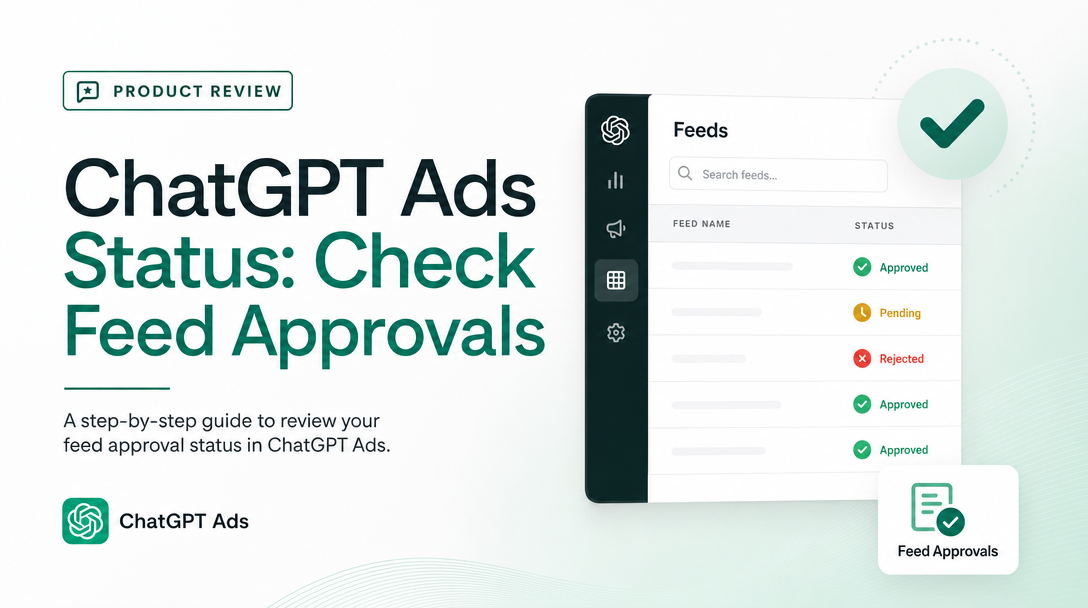
If a product in your ChatGPT Ads feed was not serving, OpenAI's documentation used to give you nothing to look at. The Help Center described the Products tab as a reporting view that only lists products after they deliver, and neither documentation surface mentioned a product review status. The only hint was OpenAI's advertiser email of 2026-09-30, which announced review status and rejection reasons in the Products tab. Our guide to ChatGPT Ads review and rejections had to label that "announced, not yet documented."
Between our captures on November 17 and November 18, the developer guide to Product Feeds gained a new section, "Check product review status." It documents GET /v1/feeds/{feed_id}/products: a paginated list of feed products filtered by approval, with a per-product review_status and, on request, a rejection reason. This guide covers what the section says, how to read the response without miscounting, where it fits next to the other product endpoints, and what OpenAI still leaves out.
The short version
- New in the developer docs:
GET /v1/feeds/{feed_id}/productsreturns feed products filtered byis_approved=trueoris_approved=false. - Two levels of access. Access to the "approval list" gets you IDs. "Review access" adds a
review_statusmap (approved,pendingorrejected) and makes rejection reasons available. is_approved=falsemixes two states. OpenAI: "This page can contain both pending reviews and final rejections." Usereview_statusto separate them.- Reasons are optional and can be null. Add
include_rejection_reasons=true. A null reason "can happen even for a rejected product." - IDs are not SKUs. "The IDs in
dataare opaque. One merchant SKU can have several indexed IDs." - Pages hold at most 100 IDs with review access, page with
after=<last_id>, and retry on HTTP 503. - Developer docs only. The Help Center has no matching text, and it still describes the Products tab without review statuses.
What changed between November 17 and November 18
The new section sits in the Product Feeds guide, after the instructions for archiving a feed and before "Product Sets & Filters." It opens:
"Use
GET /v1/feeds/{feed_id}/productsto check review decisions for products in a feed. Your selected ad account needs access to the approval list. It also needs review access to receive a status or a rejection reason."
No help-centre article changed in substance in the same window. The 39 help-centre pages our monitor flagged on November 18 differed only in sidebars, "Updated N days ago" stamps and a temporary OpenAI status banner, which we do not treat as changes. Of the developer pages, only Product Feeds changed. We found no new OpenAI advertiser email in the two days before this capture.
The request
Everything below comes from the new section unless marked otherwise.
| Parameter | What OpenAI says |
|---|---|
is_approved=false | "list indexed products with a false approval flag. This page can contain both pending reviews and final rejections." |
is_approved=true | "list products with a true flag." |
include_rejection_reasons=true | Adds a rejection_reasons map: "The map contains an entry for each ID on the page." |
limit | "defaults to 20 and must be at least 1. With review access, each page contains at most 100 IDs, even if you request a larger page. When you request reasons, a limit above 100 returns HTTP 400." |
after | "If has_more is true, repeat the request with the same filter and pass last_id as the after query parameter." |
For credentials, OpenAI says: "Use an advertiser API key or a partner OAuth token with the ads.admin.all.read scope. With a user-scoped token, send the selected account ID in the OpenAI-Ad-Account header. With an account-bound token, you can omit the header or send the bound account ID."
A request for the first page of non-approved products with reasons looks like this. The query parameters, header and base URL are OpenAI's; combining them in one call is our example.
curl -G "https://api.ads.openai.com/v1/feeds/fd_123/products" \
  -H "Authorization: Bearer ${OPENAI_ADS_API_KEY}" \
  --data-urlencode "is_approved=false" \
  --data-urlencode "include_rejection_reasons=true" \
  --data-urlencode "limit=100"
Soku analysis: the developer Authentication reference has not caught up. It still says only that "Each Ads API key is scoped to one ad account" and does not mention the OpenAI-Ad-Account header, user-scoped tokens or OAuth scopes. The custom audience and targeting guides already use the ads.admin.all.read scope for OAuth. If you call the API with a plain advertiser key, the header question does not arise: the key is bound to one account.
The response, and how to read it
OpenAI's example is a request with is_approved=false and limit=2. "The first product is pending. The second was rejected."
{
  "object": "list",
  "is_approved": false,
  "data": ["product_001", "product_002"],
  "first_id": "product_001",
  "last_id": "product_002",
  "has_more": true,
  "review_status": {
    "product_001": "pending",
    "product_002": "rejected"
  }
}
With include_rejection_reasons=true, the response adds:
{
  "rejection_reasons": {
    "product_001": null,
    "product_002": "Policy: Alcohol"
  }
}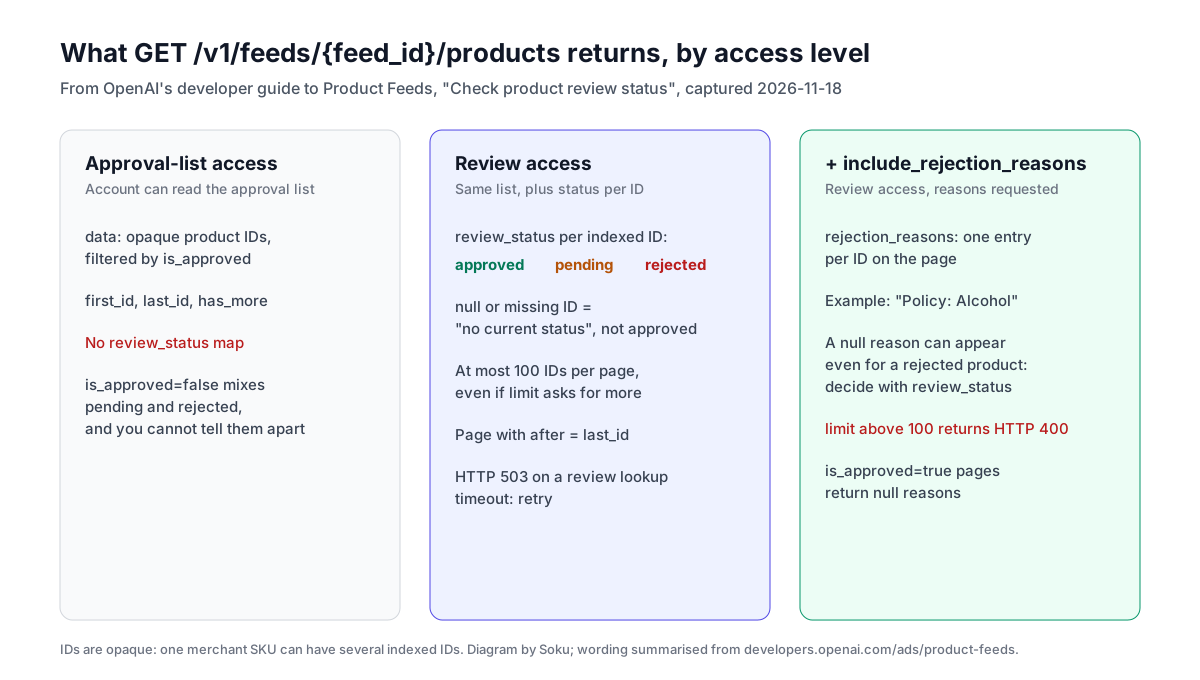
Five rules from the documentation decide whether your numbers are right:
- The approval flag is not the status.
is_approved=falsereturns pending and rejected products together. Onlyreview_statusseparates them, and only with review access. - Null is not approved. "A known status is
approved,pending, orrejected. A null value or a missing ID means the API has no current status for that ID." - Reasons are for display, status is for decisions. "A null reason means there is no current explanation to display. This can happen even for a rejected product. Use
review_statusto identify a rejection." A page requested withis_approved=true"returns null reasons." - IDs are opaque. "One merchant SKU can have several indexed IDs." OpenAI does not document how to map an indexed ID back to your
item_idin this section. - Pages are live. "Pages reflect the current catalog when requested; they are not a fixed snapshot while products change." An empty page has
data: [],first_id: nullandlast_id: null.
Soku analysis: rule 4 is the one most likely to produce a wrong report. If you count rejected IDs and present them as "rejected SKUs," you can overstate the problem, because one SKU can carry several indexed IDs. Report rejected IDs as IDs until you have a documented way to join them to your feed rows.
Paging through a whole feed
The pagination rules are short: same filter, after set to the previous last_id, stop when has_more is false. Two failure modes are documented: HTTP 400 if you ask for reasons with a limit above 100, and HTTP 503 if "a review lookup times out." OpenAI's instruction for the second is "Retry the request."
A minimal loop that follows those rules, written by us against the documented parameters:
import os, time, requests

BASE = "https://api.ads.openai.com/v1"
HEADERS = {"Authorization": f"Bearer {os.environ['OPENAI_ADS_API_KEY']}"}

def non_approved(feed_id):
    params = {"is_approved": "false", "include_rejection_reasons": "true", "limit": 100}
    while True:
        r = requests.get(f"{BASE}/feeds/{feed_id}/products", headers=HEADERS, params=params)
        if r.status_code == 503:  # documented: review lookup timed out, retry
            time.sleep(5)
            continue
        r.raise_for_status()
        page = r.json()
        statuses = page.get("review_status")  # absent without review access
        reasons = page.get("rejection_reasons", {})
        for pid in page["data"]:
            yield pid, (statuses or {}).get(pid), reasons.get(pid)
        if not page["has_more"]:
            break
        params["after"] = page["last_id"]
Soku analysis: cap the retries in production; the documentation does not say how long a timeout condition lasts. And check for a missing review_status key before you build a report on it. Without review access the call still succeeds, but every product will look status-less.
Where this fits next to the other product tools
OpenAI now documents four different places that tell you something about feed products. They answer different questions, and the Help Center warns about mixing them up.
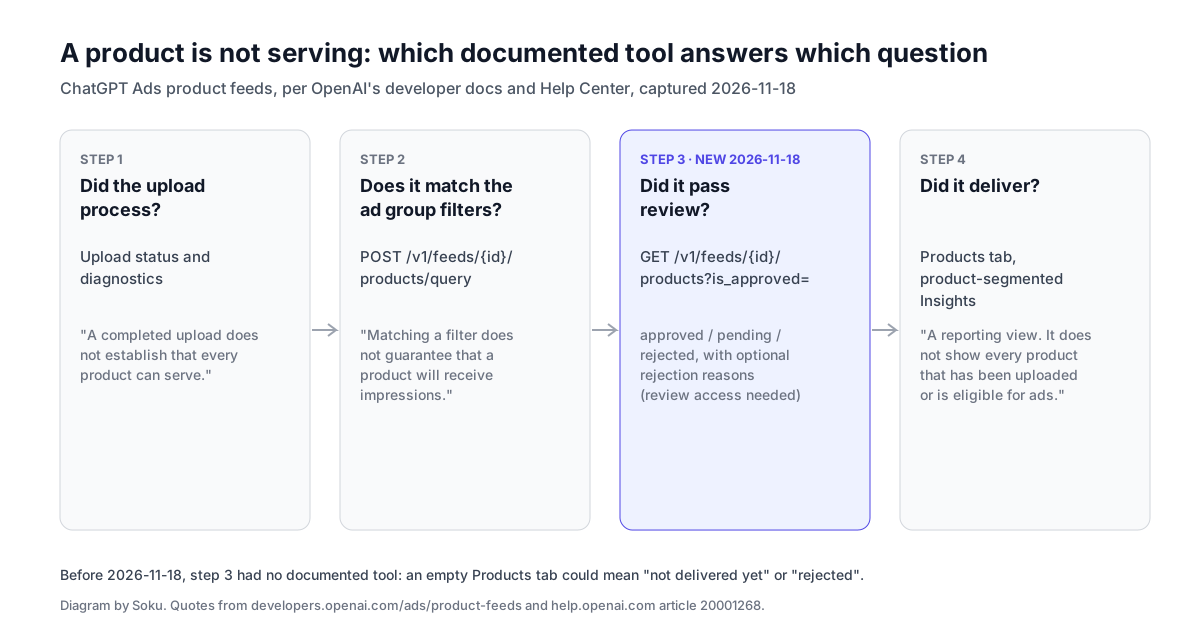
| Question | Documented tool | Caveat in OpenAI's words |
|---|---|---|
| Did my upload process? | Upload status and diagnostics | "A completed upload does not establish that every product can serve." |
| Which products match my ad group's filters? | POST /v1/feeds/{feed_id}/products/query | "Matching a filter does not guarantee that a product will receive impressions." |
| Which products passed review? | GET /v1/feeds/{feed_id}/products (new) | is_approved=false "can contain both pending reviews and final rejections." |
| Which products delivered? | Products tab, product-segmented Insights | "The Products tab is a reporting view. It does not show every product that has been uploaded or is eligible for ads." |
The developer guide also notes that the generic POST /feeds/{feed_id}/items/query "excludes deleted, expired, and ads-ineligible items without requiring review approval," and that it and the product-specific query "can return different results."
Soku analysis: the order of checks for a product that is not serving follows from this table. Upload diagnostics first, then the filter query, then review status, then delivery. Before November 18 the third step had no documented tool, so an empty Products tab could mean anything from "not delivered yet" to "rejected." Now you can rule review in or out directly. For setup of the campaigns themselves, see our product-feed campaigns guide.
Help Center, developer docs and the September email
The three sources do not contradict each other, but they describe different things.
- The 2026-09-30 advertiser email announced product review status, with rejection reasons, in the Ads Manager Products tab.
- The Help Center still says, in Create Campaigns from Product Feeds: "The Products tab is a reporting view. It does not show every product that has been uploaded or is eligible for ads. A product appears there after it has delivery data from an active product-feed campaign." Troubleshooting Common Issues repeats that and does not mention review status.
- The developer docs now document review status and reasons through the API, not through the Products tab.
So as of 2026-11-18, review status through the API is documented. Review status inside the Products tab is still announced but not documented. If you see statuses in the Products tab, the email is the only written explanation of them.
Soku analysis: the two are probably the same review data shown in two places, but OpenAI has not said so. Until the Help Center documents the Products tab view, treat the API as the source you can cite to a client or to support.
What OpenAI does not say
- How an account gets "review access." The section says the account needs it, but not how to request it or which roles have it. Our roles and permissions guide covers the documented roles; none mentions review access by name.
- How to map indexed IDs to SKUs. The IDs are opaque, and one SKU can have several.
- How long product review takes. No turnaround is documented for product review, as for ad review.
- The list of rejection reasons. The only example is "Policy: Alcohol." We do not guess at others.
- How to appeal a rejected product. No product appeal route is documented in either surface.
- Whether changes trigger a new review. The section does not say which feed edits send a product back to
pending.
Checklist for a product-feed account
- Confirm your API key belongs to the ad account that owns the feed, or send
OpenAI-Ad-Accountwith a user-scoped token. - Call
GET /v1/feeds/{feed_id}/products?is_approved=false&limit=1and check whetherreview_statuscomes back. If it does not, you do not have review access. - Page through all non-approved products with
include_rejection_reasons=trueandlimitat 100 or less. - Split the result by
review_status:rejected,pending, and null or missing. - Fix rejected products in the feed using the reasons where present. Where the reason is null, the status is still authoritative.
- Report counts as indexed IDs, not SKUs.
- Re-run the filter query for each ad group, so you know whether the products it can still use are enough to serve.
Where Soku fits
Soku reads ChatGPT Ads delivery and spend next to Google and Meta, so a product-feed campaign whose delivery drops is visible next to the rest of your paid media. Product review status itself lives in OpenAI's API and, according to OpenAI's email, in Ads Manager; use the steps above to check it.
Related reading
- ChatGPT Ads review: why ads, products and accounts get rejected or paused
- ChatGPT Ads product-feed campaigns
- ChatGPT Ads product feed carousel
- ChatGPT Ads Delta Feeds API
- ChatGPT Ads API guide
Sources
All accessed 2026-11-18 through Soku's monitor capture run-20261118T024032Z.
- OpenAI developer docs, Product Feeds, section "Check product review status" (new between 2026-11-17 and 2026-11-18), plus "Preview matching products" and "Monitor delivery."
- OpenAI developer docs, Authentication.
- OpenAI Help Center, Create Campaigns from Product Feeds.
- OpenAI Help Center, Troubleshooting Common Issues.
- OpenAI advertiser product-update email, 2026-09-30 (product review status in the Products tab). Used as a lead only; it is not cited for any documented fact above.