Soku AI

Black Friday 2026 is Friday, November 27. Cyber Monday is November 30. If this is your first holiday season on ChatGPT Ads, the platform's mechanics differ from Meta and Google in ways that matter most during a five-day sale: how a daily budget is averaged, when the budget week resets, how a total budget paces without an end date, how long a pause takes, and when the numbers you are looking at are final.
OpenAI has documented all of this, but across eight help articles. This guide puts the holiday-relevant parts in one place, with the dates worked out for this year's calendar, and ends with a dated checklist.
It does not replace our deeper guides to daily budget pacing, campaign total budgets, reporting delays or account spending limits. Read those for the full mechanics. This one is about timing.
Last verified: 2026-11-02. Soku's documentation monitor captured 65 OpenAI ads pages (37 help-centre articles, 25 developer-docs pages and 3 openai.com pages) at 00:03 UTC on 2026-11-02 (run-20261102T000348Z) with no capture errors. Quotes below come from that capture. Items that appear only in OpenAI's advertiser emails are labelled as such. Everything marked Soku analysis is our reading, not OpenAI's.
The short version
- Budget weeks run Sunday to Saturday in your ad account's time zone. Black Friday and Small Business Saturday are the last two days of one budget week. Cyber Monday is the second day of the next. Unspent budget does not cross that line.
- A daily budget can spend up to twice its amount in a day, and up to seven times its amount in a budget week.
- A campaign total budget with no end date paces over 60 days. For a short sale, always set an end date.
- Some choices cannot be undone: the campaign objective, the conversion event, and switching a daily budget back to a total budget. Build holiday campaigns new rather than repurposing old ones.
- Pausing can take up to 24 hours, and spend in that window is billable.
- Spend lags 7 to 8 hours; conversions lag 24 to 48 hours. Make same-day calls on impressions, clicks and CTR.
- Creative enhancements are on by default since October 30 unless you opted out. They can rewrite copy and change the landing URL, so stale promotion pages become a real risk.
How daily budgets behave over Black Friday week
OpenAI's Daily budgets article defines the daily budget as "the average amount you want your campaign to spend per day over a 7-day period. The budget week runs from Sunday through Saturday in your ad account's timezone."
Three rules follow from it, all quoted from the same article:
- "Your maximum daily spend is twice your daily budget." If you change the budget during a day, that day's cap "is based on the highest daily budget amount that was active at any point during that day."
- "Your maximum 7-day spend is seven times your daily budget."
- "If delivery is below your daily budget on some days, unused amounts may be used later in the same 7-day period."
Here is how that maps onto this year's calendar.
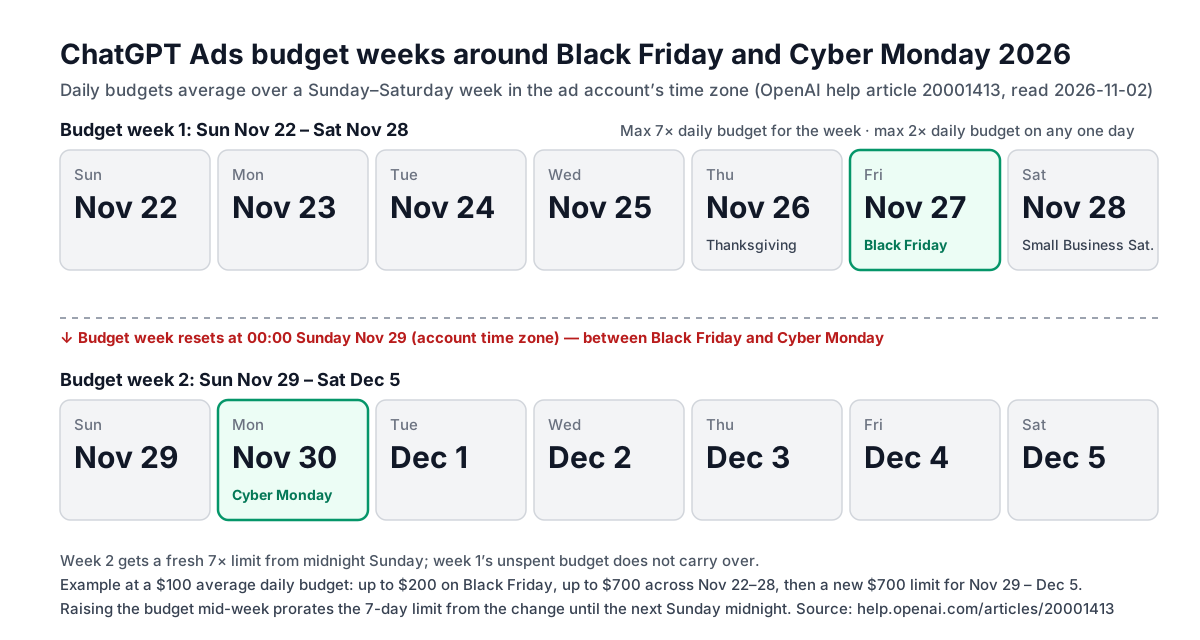
Worked example at a $100 daily budget. On Black Friday the campaign can spend up to $200. Across Sunday, November 22 to Saturday, November 28 it cannot spend more than $700. If delivery was light on Monday to Wednesday, the system may use some of that unspent money on Friday and Saturday, still within the $200 daily cap. At midnight on Sunday, November 29 a new week begins with its own $700 limit, and nothing left over from the Black Friday week comes with it.
Soku analysis: this is helpful for Black Friday and neutral for Cyber Monday. A quiet start to Thanksgiving week can be made up on Friday and Saturday, because they sit at the end of the same budget week. Cyber Monday sits at the start of a new week, so the only thing that lets a campaign spend more on Monday is the 2x daily cap or a higher budget.
Raising the budget mid-week
The article says that if you change the daily budget partway through the week, "your 7-day spending limit is prorated from the time of the latest budget change through the next Sunday at midnight". It also gives an example: raising a $100 budget to $110 later in the day makes that day's maximum $220, twice the highest budget active that day.
Soku analysis: two practical consequences follow.
- Raise the budget early in the account's day, not late. The daily cap is set by the highest budget active that day, but a change made at 6 p.m. leaves only a few hours to use it.
- Expect a mid-week raise to buy less than seven days' worth. If you raise the budget on Thursday, November 26, the prorated limit covers Thursday to Sunday midnight, roughly three days. OpenAI does not publish the exact proration formula, so read the maximum daily and 7-day amounts that Ads Manager shows when you edit the campaign. The article says Ads Manager displays them.
The fixed-bid floor
For campaigns using a daily budget with fixed bidding, the same article says "the daily budget must also be at least the highest effective per-event bid across applicable non-archived ad groups, including relevant audience bid adjustments." If you raise bids for the holidays and later try to cut the budget below them, Ads Manager will refuse until you lower the bids. The standard minimum daily budget in the US is $25, and minimums for other markets are listed in our minimum budgets by country guide.
The 60-day trap in campaign total budgets
A campaign total budget is the other option. OpenAI's Budget pacing article says Ads Manager "uses your remaining budget and campaign schedule to guide spending over time". If the campaign is ahead of pace, delivery may slow. If it is behind, delivery continues so it can catch up.
The important line for a sale: "Campaigns without an end date use a default 60-day pacing period." With an end date, Ads Manager paces against the time until that date, up to 365 calendar days.
Soku analysis: a $5,000 total budget meant for November 26 to 30, with no end date, would be paced as if it had two months to spend. Expect it to underspend over the sale. Always set the end date on a holiday total-budget campaign.
Two more rules from the same article:
- "Your end date is the latest date your campaign can deliver, but your budget may be fully spent earlier." Pacing does not guarantee the budget lasts.
- When you change the total budget or end date, pacing is recalculated. The revised budget "must cover the amount already spent. Setting it equal to the amount already spent stops delivery."
Changing the bid strategy does not override total-budget pacing either: "Low bids can still limit delivery and cause your campaign to spend less than its budget."
Decisions you cannot undo after launch
Several settings are fixed at creation. All of these come from OpenAI's Edit Campaigns, Creating campaigns and Conversion-optimized Campaigns articles.
| Setting | Can you change it later? | What OpenAI says |
|---|---|---|
| Campaign objective | No | "To change a campaign objective, create a new campaign with the objective you want." |
| Budget type | One way only | You can change a campaign-total budget to a daily budget, "but you cannot switch that campaign back to a campaign-total budget." |
| Conversion event (conversion optimisation) | No | "The conversion event cannot be changed after campaign creation." |
| Billing option (conversion optimisation) | Only by cloning | "The campaign objective and billing option cannot be changed in place after campaign creation." To move from click to impression billing, clone the campaign and select Impressions. |
| Start and end dates on your first campaign | Only after creation | "When you create your first campaign, you may not see options to choose a start or end date before publication." |
The last row has a trap. OpenAI warns: "If you need your ads to start on a specific date, don't publish the campaign just to access these settings. Your ads could start running before you've had a chance to set your schedule."
Soku analysis: if your account has never run a campaign, launch a small evergreen campaign in early November first. Your holiday campaigns are then no longer your first, and you can set their dates before publishing.
Review, account changes and landing pages
OpenAI does not publish a review time. Its Ads Policies say that when an ad is uploaded, OpenAI reviews "the title, copy, media, and landing page". Its onboarding and policy troubleshooting article adds: "Account verification, account approval, ad review, and ad delivery are separate checks. Completing one does not mean all the others are complete."
Three things can stop a holiday campaign that is otherwise ready:
- A landing page that blocks OpenAI's crawlers. OpenAI's Troubleshooting Common Issues article lists "landing pages that block OpenAI user agents" as a common cause of "Not serving". Holiday bot protection and queue pages are a likely culprit. Our OAI-AdsBot crawlability checklist covers what to allow.
- A policy problem in seasonal copy. OpenAI's Ads Policies say ads containing "obscene, vulgar, or shocking language" may be rejected even in an allowed category. Our guide to ad review rejections lists the common causes.
- Renaming the account. The developer Ad Account reference says "Changing the legal or public brand name pauses ad delivery until the account passes review." Do not rebrand the account in November.
The Troubleshooting Common Issues article also advises allowing "at least 24 hours after launch before reporting a zero-delivery issue" for a new campaign with no clear blocker.
Soku analysis: because there is no published review time and a new campaign can take a day to show delivery, have your holiday ads approved and paused well before Thanksgiving week rather than created on the day.
Billing: thresholds, holds and failed payments
Holiday spend means more card charges. OpenAI's Billing & Payment article explains how they work for self-serve card-billed accounts:
- Your card "is charged when your account reaches its assigned payment threshold", and any remaining balance is charged at the end of the month.
- Thresholds rise automatically "based on successful payment history". OpenAI's example progresses through two $25 invoices, two $50 invoices and two $100 invoices before a $200 threshold. "Support does not manually change thresholds for advertisers."
- For self-serve card-billed accounts, "if a payment fails after your account reaches its payment threshold, your ads may stop delivering until the billing issue is resolved."
Soku analysis: a newer account on a low threshold will generate many small charges during a high-spend weekend. Some banks flag that pattern as suspicious. Tell your card issuer in advance, or make sure the card has room, because a declined charge on Black Friday can stop delivery.
Two other billing notes:
- An account spending limit is a safeguard, not a pacing tool. OpenAI says it "does not allocate spend between campaigns or pace delivery". Eligible postpaid-invoice accounts can set a daily account limit; self-serve card-billed accounts cannot.
- If you add a new card before the sale, a temporary authorization hold may appear. OpenAI says it "is not a completed advertising charge" and may stay visible "for 8 days or longer depending on your bank".
Pausing is not instant
The Billing & Payment article also says: "Campaign updates may take time to apply across our ad delivery systems, so additional impressions, clicks, or spend may occur after a campaign is paused. In some cases, ads may continue to appear for up to 24 hours. Advertising costs incurred during this period remain billable."
Soku analysis: if an offer ends at midnight on Cyber Monday, pausing at 11:55 p.m. is not enough. Set the end date ahead of time, or pause earlier, and make sure the landing page still makes sense for anyone who clicks after the offer ends.
When the numbers are real
OpenAI's Measure Results article sets out reporting freshness:
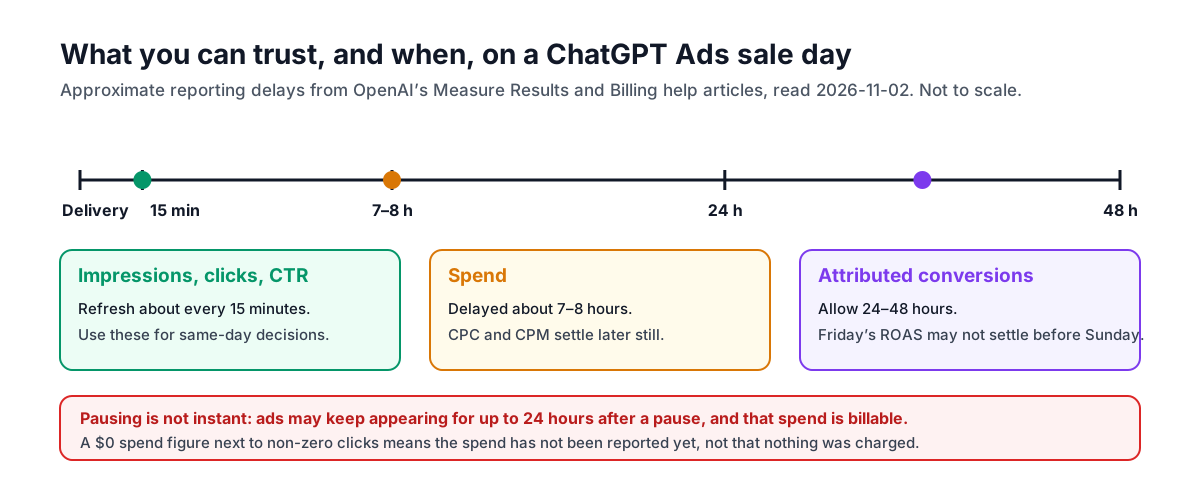
- "Impressions, clicks, and click-through rate (CTR) typically refresh approximately every 15 minutes."
- "Spend insights are delayed by approximately 7–8 hours, so recent impressions and clicks may appear before the corresponding spend." CPC and CPM depend on settled spend and update later.
- "Attributed conversions have a separate processing window and can take 24–48 hours to appear."
Two reporting settings are worth checking before the sale:
- Conversion time. By default, Conversions are dated by the ad click or impression that got credit. To see them by when the purchase happened, add Conversions (by conv. time) under Edit columns. Soku analysis: during a sale, someone who clicked on Wednesday and bought on Friday shows up on Wednesday by default. Compare both views before deciding which day "worked".
- Attribution windows. You can choose a 7-, 14- or 30-day click window and a 0- or 1-day view window. OpenAI notes that "Changing the reporting window affects reporting only; it does not change campaign optimization, bidding, or billing."
Only attributed order_created events feed the Order Created Sales and Order Created ROAS columns. If your store sends purchases under a different event, those columns will stay empty.
Creative enhancements are now on by default
OpenAI's Creative enhancements article says: "Starting Friday, October 30, 2026, creative enhancements will be enabled automatically for new and existing campaigns." Existing account- and campaign-level opt-outs are preserved, and campaign settings take priority over the account default.
Enhancements can create "new or updated headlines and descriptions", translate ad text, resize images and optimise destination URLs "to direct people to a relevant page on your website". They "can run automatically without requiring you to review or approve each version", and there is no preview of every variation.
OpenAI's preparation advice is directly relevant to a sale: "Keep your ads and landing pages current, including prices, promotions, product details, and availability."
Soku analysis: enhancements draw on your landing pages. If an expired holiday offer is still live somewhere on your site, an enhanced ad could point people to it. Before the sale, either clean up old promotion pages or opt holiday campaigns out of enhancements via Manage settings. Our creative enhancements guide covers the settings.
Formats and feeds for the holidays
Multi-image ads. The Creating ads article says the multi-image format has been an open beta in Ads Manager since Monday, October 26, 2026. You choose Multiple images under Ad format and upload "4–6 square images, each with a 1:1 aspect ratio". It is available for standard campaigns with Reach, Clicks or Conversions objectives. Specs are in our multi-image ads guide.
Product feeds. OpenAI's product feed campaigns guidance says feed processing "can take anywhere from a few minutes to a few hours depending on the size of the feed", and after delivery begins you should "allow up to seven hours for product rows to first appear in the Products tab". Upload holiday catalogue changes the day before, not the morning of. Setup is covered in our product feed campaigns guide.
What OpenAI's October 30 email adds, and what it does not
OpenAI emailed advertisers a "ChatGPT Ads Product Updates" message on October 30, 2026. Its five items, checked against the documentation on November 2:
| Email item | Documented? | Status in this guide |
|---|---|---|
| ChatGPT Ads now live in 26 more countries, 89 in total | Yes. The Ads Manager Availability table lists 89 countries as Available, and OpenAI's October 21 announcement says the same. | Documented fact |
| Creative enhancements for self-serve campaigns | Yes, in the help article quoted above. | Documented fact |
| Multi-image ads in open beta for all advertisers | Yes, in the Creating ads article. | Documented fact |
| Shopify integration "now available internationally" | No. The Shopify help article still says the integration "is currently available to all Shopify customers in the US and will be available wherever ChatGPT ads are available shortly." | Announced, not yet documented |
| A wider standard ad card on desktop, with "no advertiser action" needed | No. None of the 65 pages we monitor mentions it. | Announced, not yet documented |
Soku analysis on Shopify: both statements can be read as true at once. The help centre may simply lag the rollout. But if your holiday plan depends on the Shopify app outside the US, confirm it in your own Shopify admin first, and keep a self-managed feed as the fallback. Our Shopify integration guide tracks the history of this claim.
Soku analysis on the wider ad card: OpenAI says existing campaigns and creative are used, so there is nothing to prepare. Do not read a change in desktop CTR around this time as the effect of your own holiday edits without allowing for it.
The same day, OpenAI emailed an invitation to a webinar, "Your 2026 ChatGPT Ads Holiday Playbook", on November 4, 2026, 9:00–9:30 a.m. PT, presented by Julie Towns and Michael Iselin from the ChatGPT Ads team. Registrants who cannot attend are promised the recording.
The dated checklist
These dates are Soku's planning recommendations for a US retailer selling over Thanksgiving to Cyber Monday 2026. They are not OpenAI deadlines. OpenAI publishes no review SLA, so the buffers are deliberately generous.
| By | Do this | Why |
|---|---|---|
| Wed, Nov 4 | Attend or register for OpenAI's holiday webinar | First-party guidance; recording promised |
| Fri, Nov 6 | If your account has never launched a campaign, launch a small evergreen one | First campaigns may not offer start and end dates before publication |
| Fri, Nov 13 | Check conversion tracking and choose the event to optimise for | The conversion event cannot be changed after creation |
| Fri, Nov 13 | Allow OpenAI's crawlers on every holiday landing page, including queue or bot-protection pages | Blocked user agents cause "Not serving" |
| Tue, Nov 17 | Create holiday campaigns paused, with end dates, and get every ad through review | No published review time |
| Tue, Nov 17 | Decide on creative enhancements per campaign; clear out expired promotion pages | Enhancements are on by default and can change the landing URL |
| Fri, Nov 20 | Confirm card headroom, or postpaid terms, for the expected spend | A failed threshold charge can stop delivery |
| Fri, Nov 20 | Upload the holiday product feed | Processing can take hours; product rows up to 7 hours after delivery |
| Sun, Nov 22 | Set daily budgets for the Black Friday week | The budget week starts today |
| Thu, Nov 26 | Raise budgets early in the account's day if needed | Daily cap is twice the highest budget active that day |
| Fri, Nov 27 | Make same-day calls on impressions, clicks and CTR only | Spend lags 7–8 h; conversions 24–48 h |
| Sun, Nov 29 | Reset budgets for Cyber Monday week | New budget week; no carry-over |
| Mon, Nov 30 | Pause or end offer campaigns before the offer ends | Pauses can take up to 24 hours; that spend is billable |
| Wed, Dec 2 | Read Cyber Monday conversions by conversion time | Conversions settle 24–48 h later |
What OpenAI does not say
- How long ad review takes, or whether review is slower during the holidays.
- The exact proration formula for a mid-week daily budget change, beyond the description quoted above. Use the limits Ads Manager displays.
- Whether competition raises prices over Black Friday. OpenAI publishes no auction benchmarks, and we have none of our own to share for this season.
- When the Shopify help article will reflect international availability, or which countries the email's "internationally" covers.
- What the wider ad card looks like or how widely it has rolled out.
Where Soku fits
Soku creates and edits standard ChatGPT Ads campaigns, ad groups and ads through a partner integration. Every change waits for your approval, campaigns start paused, and a managed launch only switches a campaign on once at least one ad has passed OpenAI's review. That fits the plan above: build and approve holiday campaigns early, then switch them on when the sale starts. Since November 1, Soku's ChatGPT Ads Conversions campaigns use the conversion event setting ID that OpenAI expects, and a campaign that fails to sync shows the error on the campaign itself. Soku does not create product-feed campaigns today, so build those in Ads Manager or the API. Soku reports ChatGPT Ads spend and results next to Meta, Google and TikTok.
For the full mechanics behind this checklist, see our guides to daily budget pacing, campaign total budgets, reporting delays, conversion-optimized campaigns and everything you need to know about ChatGPT Ads.
Sources
All read or captured on 2026-11-02 unless stated.
- OpenAI help centre: Daily budgets
- OpenAI help centre: Budget pacing
- OpenAI help centre: Creating campaigns for ChatGPT Ads
- OpenAI help centre: Edit Campaigns
- OpenAI help centre: Conversion-optimized Campaigns
- OpenAI help centre: Billing & Payment
- OpenAI help centre: Measure Results
- OpenAI help centre: Troubleshooting Common Issues
- OpenAI help centre: Troubleshooting common onboarding and policy issues
- OpenAI: Ads Policies
- OpenAI help centre: Creative enhancements for ChatGPT Ads
- OpenAI help centre: Creating ads for ChatGPT Ads
- OpenAI help centre: Create campaigns from product feeds
- OpenAI help centre: Set up ChatGPT Ads for Shopify
- OpenAI help centre: Ads Manager Availability
- OpenAI developer docs: Ad Account reference
- OpenAI: ChatGPT Ads expands to 26 new countries (October 21, 2026)
- OpenAI advertiser emails of October 30, 2026: "ChatGPT Ads Product Updates" and "Join our webinar: Your 2026 ChatGPT Ads Holiday Playbook". Not published online; quoted as announcements, not as documentation.